
Real-time push-to-talk (PTT)
It provides real-time voice communication within the team. Voice quality and continuity depend on distance, terrain, antenna position and network traffic.
Push and talk
Over the AXION network
AXION R1 is an all-in-one field terminal that works without internet or cellular service. Its 7-inch touchscreen handles messaging, push-to-talk, SOS, location, photo and file sharing, and opens offline Wikipedia, maps prepared for your country, medical information and an emergency library directly on the device. No phone needed.
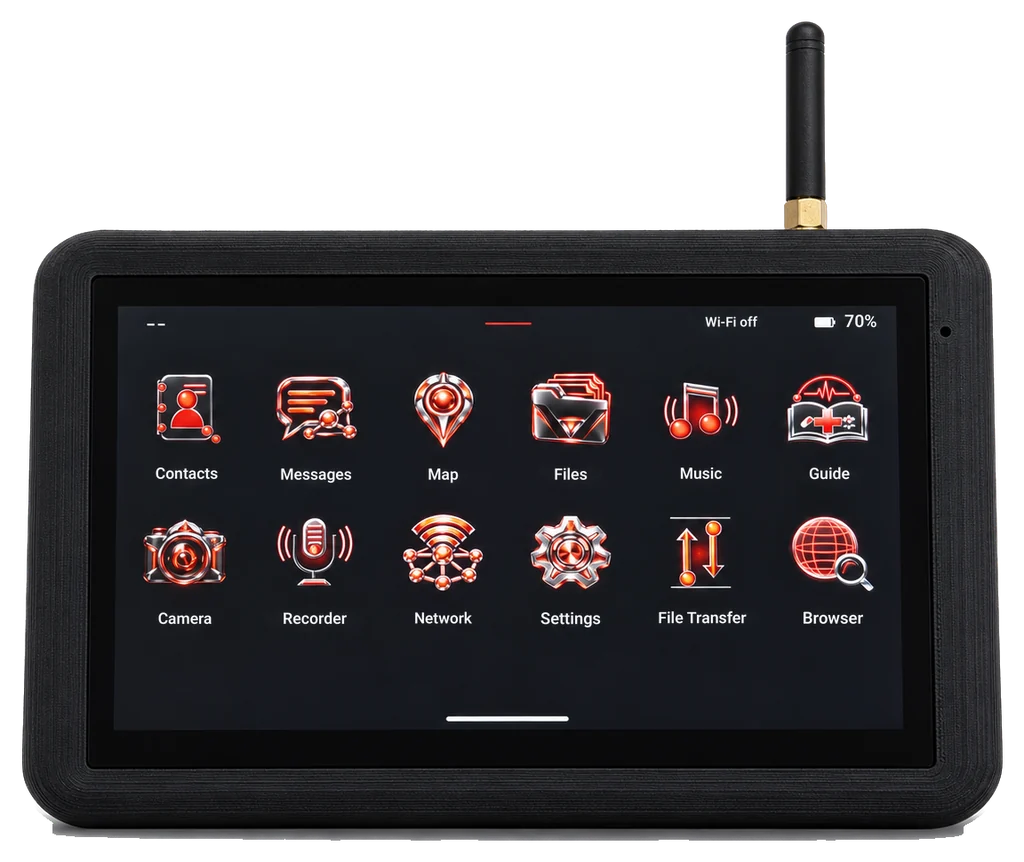
A 7-inch touchscreen, a built-in camera in the front bezel, a detachable antenna and a USB-C port on the side.


AXION R1 combines off-grid communication, field coordination and access to offline knowledge in one device. It needs no carrier, cell tower or internet to communicate: AXION devices create their own network and talk directly to the AXION R1 and AXION S1 devices around them.
Beyond text messages, it shares voice messages, photos, files and GPS location, and provides push-to-talk within the team. With the built-in camera, photos are taken without a phone and shared directly from the device.
Offline Wikipedia, maps prepared for your country, medical information and an emergency library are stored on the device's 64 GB of storage and open directly on the 7-inch screen. Designed for field teams and organizations, AXION R1 works on the same network as AXION S1.
Maps, Wikipedia, medical information and the emergency library open right on the 7-inch touchscreen. All of them are apps on the RED OS home screen.
Off-grid messaging and push-to-talk.
Offline maps prepared for your country.
Medical information and the emergency library.
Offline Wikipedia.
Photos with the built-in camera.
Share files from the device.
AXION R1 and AXION S1 are more than communicators: both carry offline Wikipedia, maps prepared for your country, medical information and an emergency library in their own storage. No internet, cellular network or cloud service is needed to access the content.
Search and read the world's encyclopedia without a connection: history, science, geography, technology, nature, health. The language edition is prepared for your destination country; devices for Türkiye carry the complete Turkish Wikipedia.
Map coverage is configured for the destination country and works without a signal. Examples: United States, United Kingdom, Germany, Italy, Türkiye. It is not a full world map.
Essential first-aid and medical reference content is stored on the device and opens when help is far away, with no internet or cellular service.
Preparedness and disaster information for before, during and after an emergency. Content is prepared for your destination country.
Medical content is for general reference only and is not a substitute for professional medical advice, diagnosis, treatment or emergency services. In an emergency, always follow the instructions of local authorities. Wikipedia® is a registered trademark of the Wikimedia Foundation; Redbrella and AXION are not affiliated with or endorsed by the Wikimedia Foundation. Article content is available under the CC BY-SA license.
AXION R1 handles every type of communication from its own screen, with no phone required.
It provides real-time voice communication within the team. Voice quality and continuity depend on distance, terrain, antenna position and network traffic.
Photos are taken with the device's own camera, without a phone, and sent to other AXION devices under suitable link conditions.
One-to-one and team conversations, with delivery status, in-chat search and ready-made message templates.
Short voice messages are recorded, sent over the network and played back on the receiving device.
Photos and documents are sent and received from device to device; needs lists, sketches and reports are shared in the field.
GPS location is shared over the network; team members appear on the on-device map.
Sent by holding for two seconds on the lock screen or the quick panel. Reachable team devices show a full-screen alert and sound a siren; location and battery level travel with the call.
AXION R1 and AXION S1 devices form a network among themselves. No central infrastructure is needed: the network is the devices in the field.
Each device is prepared once for your organization before delivery. When switched on in the field it finds the AXION devices around it and joins the network; no carrier is needed.
A message for a team out of direct reach can be relayed through suitably positioned intermediate nodes.
Every device that joins can extend the area the network reaches. The distance of a single link depends on terrain, obstacles, antenna position and conditions.
AXION R1 combines device-level security with central device management through the organization's panel.
Physical access to the device is protected by a PIN lock, with protection against repeated wrong attempts. An emergency call can still be sent from the lock screen.
Every device has its own key pair. Direct messages and attachments are encrypted end to end and decrypted only on the recipient device; intermediate nodes cannot read the content.
All of the organization's devices in a web-based panel: fleet map, emergency alerts, remote lock and wipe. See the management panel.
Devices report battery, storage, connectivity and uptime information to the panel when they reach the internet.
A device connected to Wi-Fi downloads and installs new software automatically; the user does not need to do anything.
The organization's directory is synchronized to devices, and announcements and ready-made message templates are distributed centrally. Panel accounts are separated into admin, operator and viewer roles.
Organization administrators monitor and manage the device fleet from a web-based management panel. In the field, devices communicate over the mesh network without needing the internet; the panel works over the internet and synchronizes when devices reach it through Wi-Fi. Field communication does not depend on the panel.
Redbrella creates an organization code and panel accounts for you. Accounts are separated by role: administrator, operator and viewer.
On first start each device joins the organization code through the setup wizard; the user's name and photo are entered. The organization code cannot be changed afterwards.
Devices talk to each other directly. A device that reaches Wi-Fi fetches the organization directory, announcements and templates, and delivers its health report and emergency calls to the panel.
Fleet map, emergency alerts, announcements, templates, remote lock and wipe and software roll-out are handled in the panel. Information from the field is updated in the panel as devices reach the internet.
Last position and last-seen time reported to the panel by each device, on a map.
Calls that reach the panel are listed at the top, with location, battery and caller.
Battery, storage, signal strength, uptime and restart count.
One text to the whole organization; shown as a separate channel on devices.
Ready-made messages for your organization, distributed to devices automatically.
A lost device is locked remotely; its content is erased if necessary.
A new release is uploaded to the panel; devices update one by one, silently.
Each organization manages its own accounts; permissions are limited by role.
The sequence below is a representative scenario showing how a provincial disaster coordination team would use the devices.
After the shock, cell towers go offline. Teams switch on their devices; the AXION R1 and AXION S1 devices find each other and form the network. Nobody configures anything.
Every team's position appears on the map. Command sees which team is in which neighborhood without waiting for coverage and directs a new team to the nearest point.
The search-and-rescue team photographs the building, adds a short voice note and sends it to command. The message hops across two devices in between, and the photo opens on the commander's screen.
The device of the officer at the assembly area links the area to command and also bridges two neighborhoods. The list of needs is shared as a file; the logistics team opens the same list on their own device.
The night team takes over the device; every conversation, photo and position from the day is still on it. When coverage returns, the device fetches its updates over Wi-Fi.
With its large screen, camera, push-to-talk and knowledge library, AXION R1 is designed for organizational use. For individual users we offer AXION S1.
Infrastructure-independent information flow between field teams during disaster coordination.
A disaster-time communication network between neighborhoods, assembly areas and municipal teams.
Message, location and photo sharing between teams at the rubble site; team members' positions are tracked on the map.
An independent communication layer against network outages in critical infrastructure such as energy, water and transport.
Team communication at sites with weak or no network coverage, such as energy, mining, construction and logistics.
The knowledge library and maps right on the device.
For offline content, photos and files.
Lithium polymer.
Package size 21 × 14 × 6 cm (8.3 × 5.5 × 2.4 in), weight including the box 850 g (1.9 lb). A power adapter is not included. For multi-unit orders, the number of devices, antennas and cables matches the device count; see the kits.
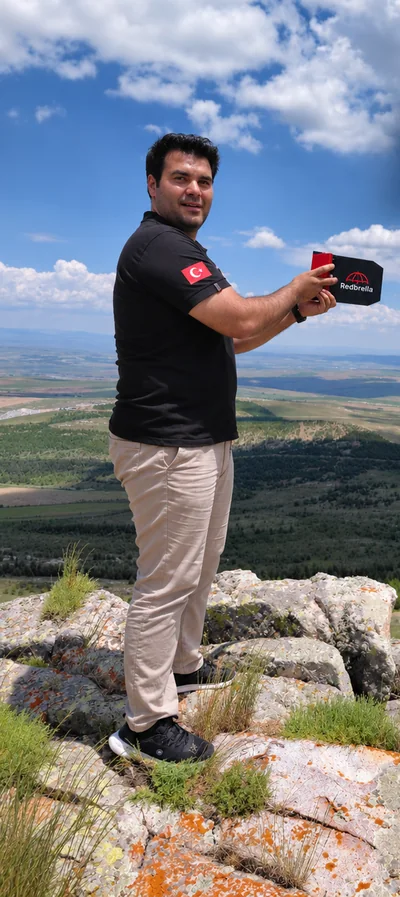
101km
An experimental long-distance field test using a directional antenna under specific test conditions. This result is not the guaranteed operating range of the standard antenna supplied with the device, and it is not presented as a feature of any single model.
Everyday communication distance depends on terrain, obstacles, antenna position and conditions. Messages for a recipient out of direct reach can be relayed through AXION devices in between.
Both devices offer off-grid communication and offline knowledge, and both work on the same network. AXION R1 offers a large screen, a built-in camera and direct on-device access; AXION S1 is more compact for individual users, with knowledge accessed through the phone.
| Feature | AXION R1 | AXION S1 |
|---|---|---|
| Role | All-in-one field terminal | Communicator & knowledge server |
| Best for | Field teams and organizations | Individuals and families |
| Display | 7-inch touchscreen | 2.8-inch touchscreen |
| Knowledge access | Directly on the device | Phone + Red App (local Wi-Fi) |
| Storage | 64 GB | 32 GB internal |
| Battery | 10,000 mAh | 2,500 mAh |
| Camera | Built-in | — |
| GPS and location sharing | Yes | Yes |
| Text messages and SOS | Yes | Yes; no phone needed |
| Push-to-talk and voice messages | Yes | Yes; no phone needed |
| Photo and file sharing | Directly on the device | With Red App |
| Offline Wikipedia | Yes; on the device screen | Yes; stored on S1, read on your phone |
| Country-specific offline maps | Yes; Map app on the device | Yes; with Red App |
| Medical and emergency library | Yes; Guide app on the device | Yes; with Red App |
| Wi-Fi | File transfer | Local phone access |
| Ports | USB-C | 2 × USB-C |
| Antenna | Detachable | Detachable |
| Mesh network | Multi-hop; same network | Multi-hop; same network |
| Operating system | RED OS | RED OS |
| In the box | Device, antenna, USB-A to USB-C cable | Device, antenna, USB-A to USB-C cable |
Both devices work together on the same AXION network. Everyday communication distance depends on terrain, obstacles, antenna position and conditions, so no standard range figure is given. For a measured result, see the 101 km field test.
Each tool answers a need. AXION R1 is designed for sharing data within a team where there is no infrastructure; it does not replace existing systems but closes the gap between them.
| Mobile phone | Radio (analogue / digital) | Satellite phone | AXION R1 | |
|---|---|---|---|---|
| Infrastructure | Cell towers and a carrier | Direct, or via repeaters / base stations | Satellite access and a subscription | None; the devices are the network |
| When the network fails | Stops working | Works in direct mode; repeater-based systems depend on infrastructure | Works with a clear view of the sky | Keeps working |
| Shared content | Anything (with coverage) | Voice; digital systems also short messages and location | Voice and short text | Text, voice note, photo, location, file |
| Team positions | Via an app (with coverage) | On some digital systems | Limited | On the map, over the mesh network |
| How coverage grows | Carrier investment | Installing repeater stations | Depends on satellite coverage | Grows with every device that joins |
| License and subscription | Line subscription | Frequency allocation in professional bands | Subscription and per-minute fees | No license or subscription required |
| Records and traceability | Depends on the app | Depends on the system | Limited | All conversations and recordings kept on the device |
| Setup | Ready | Frequency plan and channel training | Activation | Switch on and use; no operator |
Swipe the table sideways to see all columns.
Large touch targets, high contrast, simple flows; Contacts, Messages, Map, Files, Camera, Guide and the other applications. See it with real screenshots on the RED OS page.
AXION R1 is designed for field teams and organizations. For emergency preparedness, family communication, camping and hiking, the compact AXION S1, which works on the same network, is available in our Etsy shop.
We prepare tailored quotes for AXION R1. We review your team structure, field conditions and the number of devices you need, and prepare a tailored quote for public agencies, companies, distributors and bulk orders.
We prepare corporate quotes for AXION R1. Just tell us the quantity, destination country and your use case in the form; we respond within 2 hours at most. For individual users, AXION S1 is available in Redbrella Technology's official Etsy shop.
Every AXION device is a transmitter, a receiver and a relay at the same time. Messages that cannot reach their recipient directly hop through the devices in between. This structure is called a mesh network and needs no central infrastructure.
Offline Wikipedia, maps prepared for your country, medical and first-aid information, and an emergency library. Everything opens without an internet connection, directly on the AXION R1's 7-inch screen in the Map, Guide and Browser apps.
Content is prepared for the destination country. Devices for Türkiye carry the complete Turkish Wikipedia and the map of Türkiye. Maps cover the selected country; it is not a full world map.
Distance depends on terrain, obstacles, antenna position and conditions, so we do not give a standard range figure. In an experimental field test with a directional antenna under specific conditions, point-to-point communication over 101 km was measured; this is not the guaranteed range of the standard antenna. On a mesh network, messages can travel further through intermediate devices.
AXION R1 is designed to work alongside existing systems and complements them: beyond voice, it adds messages, photos, locations and record sharing. We review your integration needs together during the quotation process.
AXION R1 has GPS. Location is determined without the network and shared with the team over the mesh; team members appear on the on-device map.
Yes. AXION R1 and AXION S1 communicate directly on the same AXION network and carry each other's messages. AXION R1 is designed for field teams and organizations, AXION S1 for individuals and families.
The Redbrella mesh communication system has been field tested with 3,000 devices. For large deployments, we plan the network structure and node placement together with the organization.
One AXION R1, one detachable antenna and one USB-A to USB-C cable. A power adapter is not included.
Yes. Private messages are end-to-end encrypted; a receiver listening to the network cannot read their content. Physical access to the device is protected with a PIN lock.
No. Organizations do not need to obtain a license or sign up with a carrier to use AXION R1.
When AXION R1 connects to a Wi-Fi network, it downloads and installs new software automatically; the user does not need to do anything.