With AXION R1 and AXION S1 · AndroidRed App · AXION Mobile App
The AXION network, on your phone's screen.
Red App is the mobile access app used with AXION R1 and AXION S1. Red App is not a communication infrastructure on its own: the AXION device does the communicating, and the phone is the interface. When the phone is connected to a device, compatible functions are reached from the phone's screen; what you send is relayed to the network through the AXION device. No internet or cellular service is needed.
End-to-end encryptionOffline team mapPhotos and filesOffline WikipediaNo accounts, no ads
Use with the devices
One app that works with both devices.
Red App connects to both AXION R1 and AXION S1. The app does not replace the devices; both keep communicating without a phone.
AXION R1
AXION R1 + Red App
With a connection between the phone and AXION R1, compatible communication functions are reached from the mobile app. AXION R1 continues to work on its own with its screen, camera and applications; Red App brings the same functions to the phone's screen.
AXION S1 provides messaging, voice messages, push-to-talk, SOS and location without a phone. When your phone joins the S1's local Wi-Fi, the offline Wikipedia, maps, medical information and emergency library stored on the S1 open in Red App; photos and files are also transferred to the S1 with Red App and sent to the network. The content lives inside the S1, not on the phone. The phone connection does not replace the S1's independent communication capability, it extends it.
Each function is one tap away from the large tiles on the home screen. Red App uses the shared design language of the AXION product family: dark background, high contrast, large touch targets.
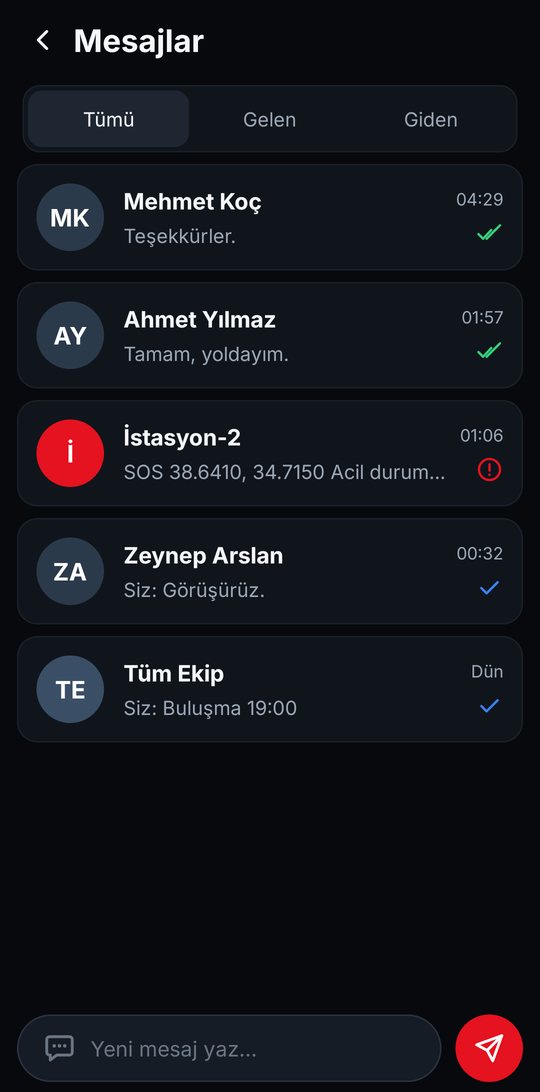
Messages
One-to-one and team conversations and location sharing, with queued, sent and delivered status on every message.
Photos and files
Photos taken with the phone's camera and files on the phone are sent to the mesh network through the AXION device; incoming ones open in the app. On AXION S1, photo and file communication works this way.
End-to-end encryption
The same encryption layer as the AXION devices. Messages are decrypted only on the recipient's device; relaying nodes cannot read them.
Emergency call
Holding the SOS button for three seconds broadcasts a call with your location to devices reachable on the mesh network; releasing early cancels it.
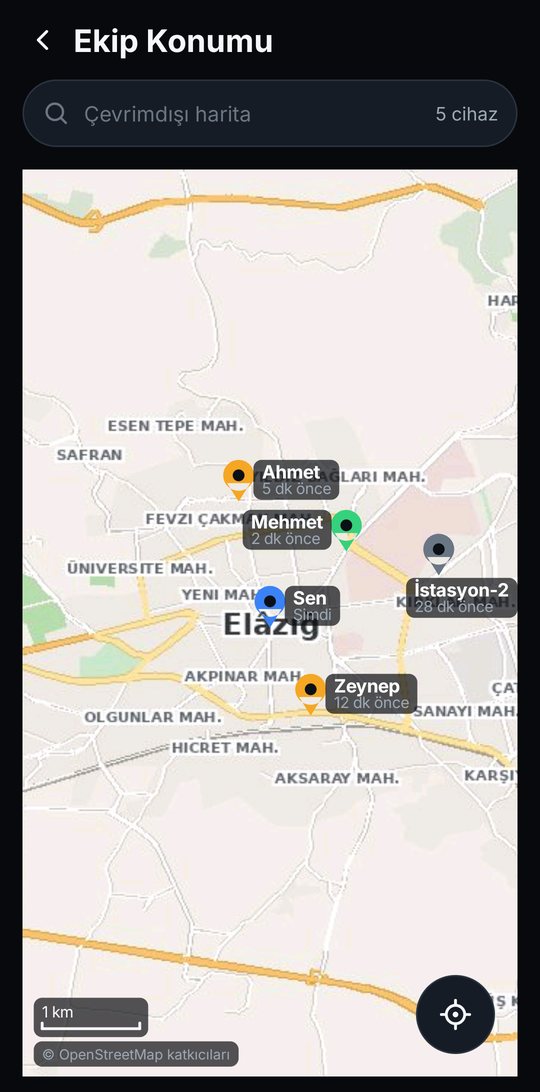
Team location
Team members' last known positions and how long ago they were seen, on an offline map.
Offline knowledge library
With AXION S1, offline Wikipedia, maps prepared for your country, medical information and the emergency library are searched and read in the app with no internet connection; the content comes from the S1's 32 GB storage over local Wi-Fi. On AXION R1, the same library is available directly on the device's screen.
Directory and announcements
The organization directory and the devices on the network in one list; announcements published by your organization, with urgent ones highlighted.
Screens
From the app.
Messages
All, received and sent; delivery status on every row.
Conversation
Encrypted messaging and location messages with a map.
Emergency
Three-second hold, countdown and location.
Team location
Team members on an offline map.
Screenshots taken from the app. Red App currently runs a Turkish interface; the conversation screen shows an English interface preview prepared from a real screenshot. Names are sample data.
AXION product family
Red App works with AXION R1 and AXION S1.
You can find the devices' features and their comparison on the product pages. AXION S1 is available in our Etsy shop.